Adding and managing content
This section describes how catalog administrators add, edit, organize, and delete catalog entries (datasets of any type).
Choose a data type below, or continue with the overview of types and publishing approaches.
| Data type | Guide |
|---|---|
| Microdata | Unit-level survey, census, and administrative data (DDI) |
| Geospatial | Geographic datasets and services (ISO 19139) |
| Indicators & time series | Publishing · Admin UI · Frontend |
| Tables | Statistical tables |
| Documents | Publications and bibliographic entries |
| Images | Photos and image resources |
| Videos | Video entries |
| Scripts | Programs and analysis scripts |
Also see: Entry lifecycle · Making data accessible via API · Visualizations & data preview
Data types and external resources
NADA distinguishes entries by data type. For each data type, a specific metadata standard or schema must be used to generate and store the metadata. The information contained in the metadata, and the way the metadata will be displayed and made searchable and accessible, is thus specific to each data type. Instructions are thus provided for each type of data, although the core principles are the same for all types of data. Also, external resources (which you can interpret as "any related electronic file that should be provided in a catalog entry page") can be attached to catalog entries independently of the data type.
Data types
As a reminder, the data types that NADA can ingest, and the related metadata standards and schemas, are the following:
Microdata: Microdata are the unit-level data on a population of individuals, households, dwellings, facilities, establishments, or other. They can be generated from surveys, censuses, administrative recording systems, or sensors. Microdata are documented using the DDI-Codebook metadata standard.
Statistical tables: Statistical tables are summary (aggregated) statistical information provided in the form of cross-tabulations, e.g., in statistics yearbooks or census reports. They will often be a derived product of microdata. Statistical tables are documented using a metadata schema developed by the World Bank Data Group.
Indicators and time series: Indicators are summary (or aggregated) measures derived from observed facts (often from microdata). When repeated over time at a regular frequency, the indicators form a time series. Indicators and time series are documented using a metadata schema developed by the World Bank Data Group.
Geographic datasets and geographic data services: Geographic (or geospatial) data identify and depict geographic locations, boundaries, and characteristics of the surface of the earth. They can be provided in the form of datasets or data services (web applications). Geographic datasets and data services are documented using the ISO 19139 metadata standard.
Documents: Text is data. Using natural language processing (NLP) techniques, documents (i.e. any bibliographic citation, such as a book, a paper, and article, a manual, etc.) can be converted into structured information. NLP tools and models like named entity recognition, topic modeling, word embeddings, sentiment analysis, text summarization, and others make it possible to extract quantitative information from unstructured textual input. Documents are documented using a schema based on the Dublin Core with a few aditional elements inspired by the MARC21 standard.
Images: This refers to photos or images available in electronic format. Images can be processed using machine learning algorithms (for purposes of classification or other). Note that satellite or remote sensing imagery are considered here as geographic (raster) data, not as images. Images are documented using either the IPTC metadata standard, or the Dublin Core standard.
Videos. Videos are documented using a metadata schema inspired by the Dublin Core and the VideoObject schema from schema.org.
Scripts: Although they are not data per se, we also consider the programs and scripts used to edit, transform, tabulate, analyze and visualize data as resources that need to be documented, catalogued, and disseminated in data catalogs. Scripts are documented using a metadata schema developed by the World Bank Data Group.
Information on the metadata standard and schemas is available at https://ihsn.github.io/nada-api-redoc/catalog-admin/# and in a Schema Guide.
Data type tabs
In the NADA catalog, data will be organized by type. ALL entries are listed in the first tab, labeled "All". The entries for each data type will be displayed in a separate tab in the catalog listing. This will allow users to focus their attention to data of the type of interest.
NADA will only display a tab when there is at least one data of the corresponding type in the catalog. Tabs are automatically added when an entry for a new data type is added.
The sequence in which the tabs are displayed can be controlled in site settings.

External resources
External resources are electronic files (or links to electronic files) of any type, that you may want to attach to an entry metadata as "related materials". This could for example be the PDF version of the survey questionnaire and interviewer manual related to a survey microdataset, or visualizations related to a published document. A simple metadata schema (based on the Dublin Core standard) is used to document external resources. This schema includes an element that indicates the type of the resource (e.g., microdata, analytical document, administrative document, technical document, map, website, etc.) In NADA, you will publish the metadata related to a dataset, then add such external resources to it.
Adding a catalog entry: four approaches
A new entry can be added to a NADA catalog in different manners. We already mentioned that this can be done either using the web interface, or using the catalog API and a programming language.
The way an entry is added to a NADA catalog will also depends on the form in which the metadata are available:
- When metadata compliant with one of the recognized standards and schemas is provided in electronic files: the process will then consist of uploading the metadata file(s), uploading the related resource files (data, documents, etc.), and selecting data dissemination options (access policy). Uploading such files can be done using the web interface or using the API.
- When metadata are not readily available in an electronic file, metadata can be created from scratch in NADA and published using the web interface. This option is not (yet) available for Geospatial data, and is not recommended for microdata.
- When metadata are not readily available in an electronic file, metadata can be created using a programming language (R or Python) and published using the API.
We briefly present these three options below. In subsequent sections, we will describe in detail how they are applied (when available) to each data type.
Loading metadata files using the web interface
When metadata files compliant with a metadata standard or schema recognized by NADA are available (typically generated using a specialized metadata editor), these files can be uploaded in NADA using the web interface. The interface will also be used to upload the related resource files (the external resources), to add a logo/thumbnail, and to specify the dataset access policy. This approach currently applies only to microdata and external resources. It will be added to other data types in future releases of NADA.
To use this approach, you will need to access the page in the administrator interface where you can add, edit, and delete entries.
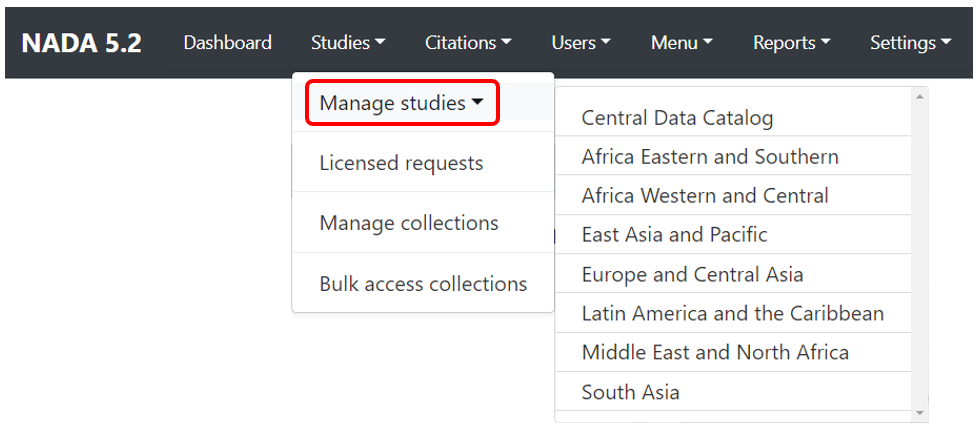
Click on Studies > Manage studies and select the collection in which you want to add an entry (if you have not created collections, the only option will be the Central Data Catalog).
A list of entries previously entered in the catalog/collection will be displayed, with options to search and filter them.
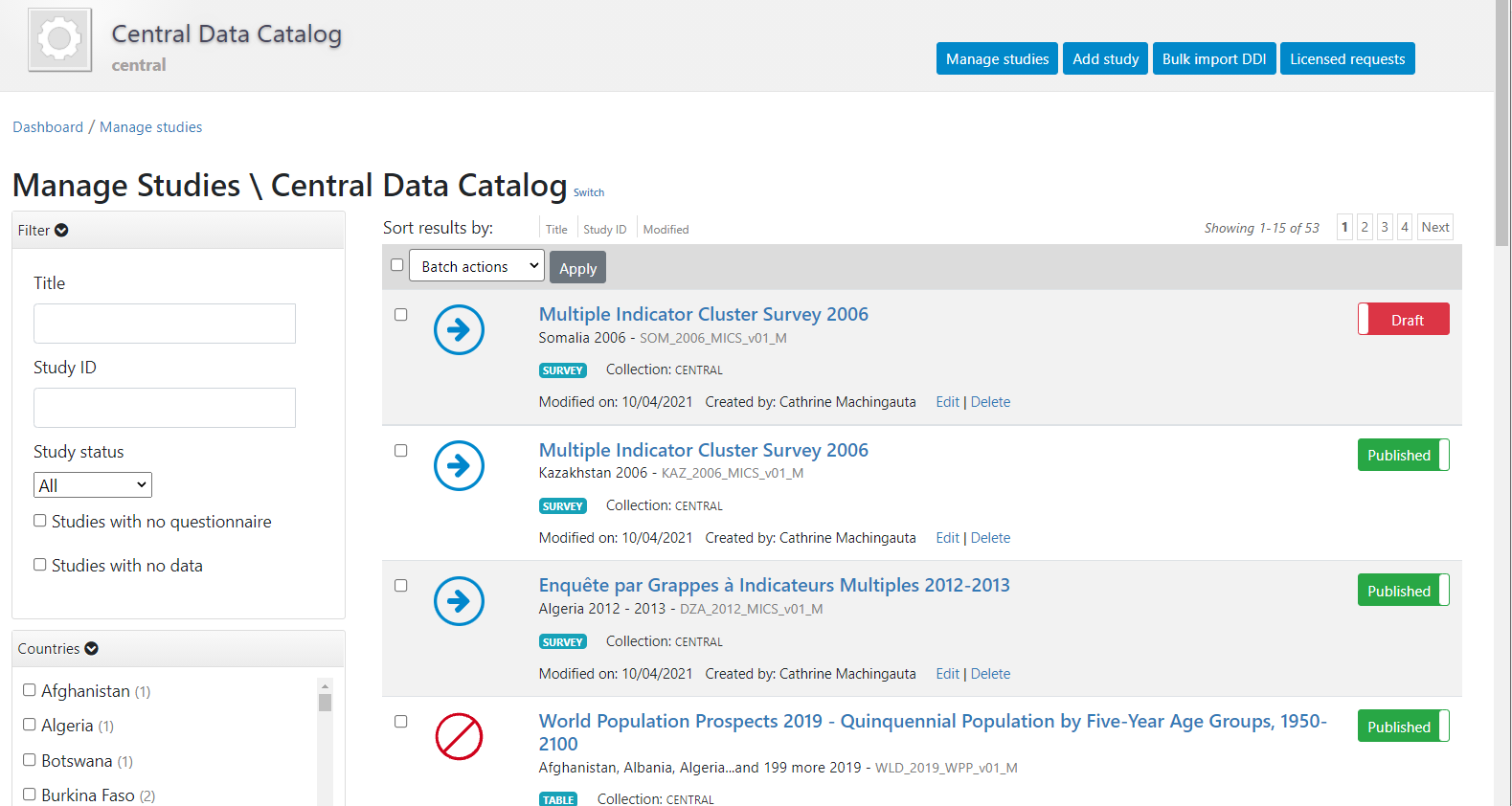
In this page, the Add study button will allow you to access the pages where entries can be added.

Creating an entry from scratch using the web interface
The metadata can be created directly in NADA, using the embedded metadata editor. This approach will also require access to the "Add entry" page of the NADA administrator interface (see above). The option is available for all data types but is recommended only for data that require limited metadata (such as images, or documents). For other types of data, manually generating comprehensive metadata can be a very tedious process (e.g., for microdata where metadata related to hundreds if not thousands of variables would have to be manually entered).
Loading metadata files using the API
This approach currently applies only to microdata, geographic datasets, and external resources. It will be added to other data types in future releases of NADA.
If you use this approach, you will need an API key with administrator privileges. API keys must be kept strictly confidential. Avoid entering them in clear in your scripts, as you may accidentally reveal your API key when sharing your scripts (if that happens, immediately cancel your key, and issue a new one).
Once you have obtained a key (issued by a NADA administrator), you will have to enter it (and the URL of the catalog you are administering) before you implement any of the catalog administration functions available in NADAR or PyNADA. This will be the first commands in your R or Python scripts. It is done as follows:
Using R:
library(nadar)

my_key <- read.csv("*...*/my_keys.csv", header=F, stringsAsFactors=F)
set_api_key(my_key\[5,1\]) # Assuming the key is in cell A5
set_api_url("http://*your_catalog_url*/index.php/api/")
set_api_verbose(FALSE)
Using Python:
import pynada as nada
my_key = pd.read_csv(".../my_keys.csv", header=None)
nada.set_api_key(my_keys.iat\[4, 0\])
nada.set_api_url(\'https:// *your_catalog_url* /index.php/api/\')
Then use function in NADAR or PyNADA to add an entry by importing the metadata using the available import functions. In NADAR: - import_ddi - geospatial_import - external_resources_import
Examples are provided in the next sections.
Creating an entry from scratch using the API
Metadata can also be generated and published programmatically, for example using R or Python, and uploaded to NADA using the API and the NADAR package of PyNADA library. This option allows automation of many tasks and offers the additional advantage of transparency and replicability. For administrators with knowledge of R and/or Python, this is a recommended approach except for microdata (for which the best approach is to use a specialized metadata editor).
The metadata generated programmatically must comply with one of the metadata standards and schemas used by NADA, documented in the NADA API and in the Guide on the Use of Metadata Schemas. If you use this approach, you will need to provide an API key with administrator privileges and the catalog URL in your script, as shown in the previous paragraph. Then you add the code that generates the metadata and publish it in your catalog using the relevant _add function.
Metadata standards and schemas
The documentation of the metadata standards and schemas recognized by NADA is available at https://ihsn.github.io/nada-api-redoc/catalog-admin/#. A Schema Guide is also available, which provides more detailed information on the structure, content, and use of the metadata standards and schemas.
In all schemas, most elements are optional. This means that schema-compliant metadata can be very brief and simple. Almost no one will ever make use of all metadata elements available in a schema to document a datatset. We provide below a very simple example of the use of R and Python for publishing a document (with only a few metadata elements).
Generating compliant metadata using R
Metadata compliant with a standard/schema can be generated using R, and directly uploaded in a NADA catalog without having to be saved as a JSON file. An object must be created in the R script that contains metadata compliant with the JSON schema. The example below shows how such an object is created and published in a NADA catalog. We assume here that we have a document with the following information:
- document unique id: ABC123
- title: Teaching in Lao PDR
- authors: Luis Benveniste, Jeffery Marshall, Lucrecia Santibañez (World Bank)
- date published: 2007
- countries: Lao PDR.
- The document is available from the World Bank Open knowledge Repository at http://hdl.handle.net/10986/7710.
We will use the DOCUMENT schema to document the publication, and the EXTERNAL RESOURCE schema to publish a link to the document.
In R or Python, publishing metadata (and data) in a NADA catalog requires that we first identify the on-line catalog where the metadata will be published (by providing its URL) and provide a key to authenticate as a catalog administrator. We then create an object (a list in R, or a dictionary in Python) that we will name my_doc (this is a user-defined name, not an imposed name). Within this list (dictionary), we will enter all metadata elements, some of which can be simple elements, while others are lists (dictionaries). The first element to be included is the document_description, which is required. Within it, we add the title_statement which is also required and contains the mandatory elements idno and title (all documents must have a unique ID number for cataloguing purpose, and a title). The list of countries that the document covers is a repeatable element, i.e. a list of lists (although we only have one country in this case). Information on the authors is also a repeatable element, allowing us to capture the information on the three co-authors individually. This my_doc object is then published in a NADA catalog. Last, we publish (as an external resource) a link to the file, with only basic information. We do not need to document this resource in detail, as it corresponds to the metadata provided in my_doc. If we had a different external resource (for example an Excel table that contains all tables shown in the publication), we would make use of more of the external resources metadata elements to document it. Note that instead of a URL, we could have provided a path to an electronic file (e.g., to the PDF document), in which case the file would be uploaded to the web server and made available directly from the on-line catalog. We had previously captured a screenshot of the cover page of the document to be used as thumbnail in the catalog (optional).
library(nadar)

# Define the NADA catalog URL and provide an API key
set_api_url("http://nada-demo.ihsn.org/index.php/api/")
set_api_key("a1b2c3d4e5")  # Note: an API key must always be kept confidential

thumb  <- "C:/DOCS/teaching_lao.JPG"  # Cover page image to be used as thumbnail

# Generate and publish the metadata on the publication

doc_id <- "ABC001"

my_doc <- list(

   document_description = list(

      title_statement = list(
        idno = doc_id,
        title = "Teaching in Lao PDR"
      ),

      date_published = "2007",

      ref_country = list(
        list(name = "Lao PDR",  code = "LAO")
      ),

      # Authors: we only have one author, but this is a list of lists
      # as the 'authors' element is a repeatable element in the schema
      authors = list(
        list(first_name = "Luis",     last_name = "Benveniste", affiliation = "World Bank"),
        list(first_name = "Jeffery",  last_name = "Marshall",   affiliation = "World Bank"),
        list(first_name = "Lucrecia", last_name = "Santibañez", affiliation = "World Bank")
      )

   )

)

# Publish the metadata in the central catalog
add_document(idno = doc_id,
             metadata = my_doc,
             repositoryid = "central",
             published = 1,
             thumbnail = thumb,
             overwrite = "yes")

# Add a link as an external resource of type document/analytical (doc/anl).
external_resources_add(
  title = "A comparison of the poverty profiles of Chad and Niger, 2020",
  idno = doc_id,
  dctype = "doc/anl",
  file_path = "http://hdl.handle.net/10986/7710",
  overwrite = "yes"
)
The document is now available in the NADA catalog.
Generating compliant metadata using Python @@@@
The Python equivalent of the R example provided above is as follows:
# Define the NADA catalog URL and provide an API key
set_api_url("http://nada-demo.ihsn.org/index.php/api/")
set_api_key("a1b2c3d4e5")  # Note: an API key must always be kept confidential

thumb  <- "C:/DOCS/teaching_lao.JPG"  # Cover page image to be used as thumbnail

# Generate and publish the metadata on the publication

@@@ doc_id = "ABC001"

document_description = {

  'title_statement': {
      'idno': "ABC001",
      'title': "Teaching in Lao PDR"
  },

  'date_published': "2007",

  'ref_country': [
		{'name': "Lao PDR", 'code': "Lao"}
	],

  # Authors: we only have one author, but this is a list of lists
  # as the 'authors' element is a repeatable element in the schema
  'authors': [
      {'first_name': "Luis",     'last_name': "Benveniste", 'affiliation' = "World Bank"},
      {'first_name': "Jeffery",  'last_name': "Marshall",   'affiliation' = "World Bank"},
      {'first_name': "Lucrecia", 'last_name': "Santibañez", 'affiliation' = "World Bank"},
  ]

}
Examples specific to each data type are provided in the next sections.