Managing catalog entries
This page covers featuring, deleting, replacing, editing, and publishing or unpublishing entries.
@@@
Deleting an entry
Using the administrator interface
Using the API
Deleting an entry (of any type except external resource) from a catalog only requires knowing the unique identifier of the entry in the catalog. The entry can then be deleted using NADAR (for R users) or PyNADA (for Python users), after providing an API authentication key and the URL of the catalog, as follows (assuming the entry to be deleted has an ID = ABC123):
In R:
r
library(nadar)

my_keys <- read.csv("C:/CONFIDENTIAL/my_keys.csv", header=F, stringsAsFactors=F)
set_api_key(my_keys[5,1])  # Assuming the key is in cell A5
set_api_url("http://nada-demo.ihsn.org/index.php/api/")

catalog_delete(idno = "ABC123")
In Python:
python
import pynada as nada

my_keys = pd.read_csv("confidential/my_keys.csv", header=None)
nada.set_api_key(my_keys.iat[4, 0])  # Assuming the key is in cell A5
nada.set_api_url('http://nada-demo.ihsn.org/index.php/api/')

nada.catalog_delete(idno = "ABC123")
Deleting external resources
Using the administrator interface
Using the API
In R:
r
library(nadar)

my_keys <- read.csv("C:/CONFIDENTIAL/my_keys.csv", header=F, stringsAsFactors=F)
set_api_key(my_keys[5,1])  # Assuming the key is in cell A5
set_api_url("http://nada-demo.ihsn.org/index.php/api/")

@@@@@@@
In Python:
python
import pynada as nada

my_keys = pd.read_csv("confidential/my_keys.csv", header=None)
nada.set_api_key(my_keys.iat[4, 0])  # Assuming the key is in cell A5
nada.set_api_url('http://nada-demo.ihsn.org/index.php/api/')

@@@@@@@@
Replacing an entry
Using the administrator interface
Using the API
Editing an entry
Risk of discrepancy
Using the administrator interface
Using the API
Powerful automation options. Can programmatically change any specific piece of metadata, for one or multiple entries.
See the NADAR or PyNADA documentation.
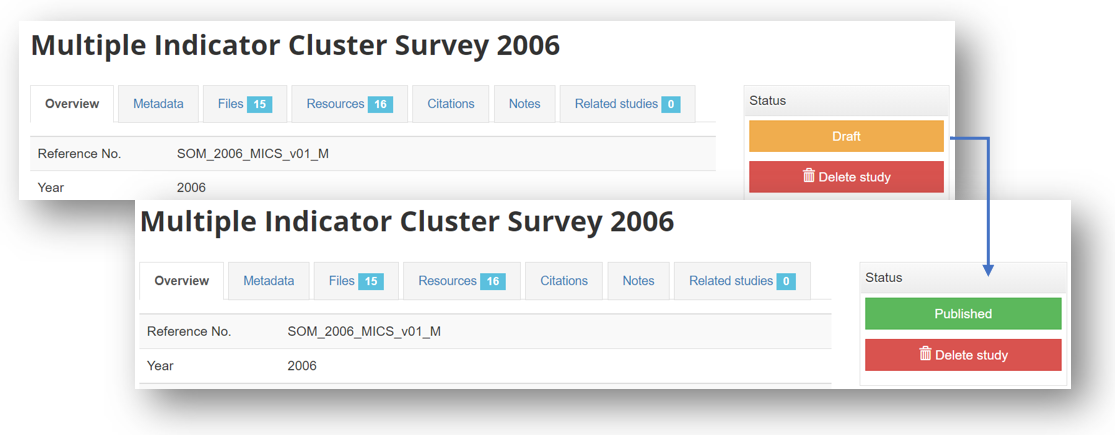
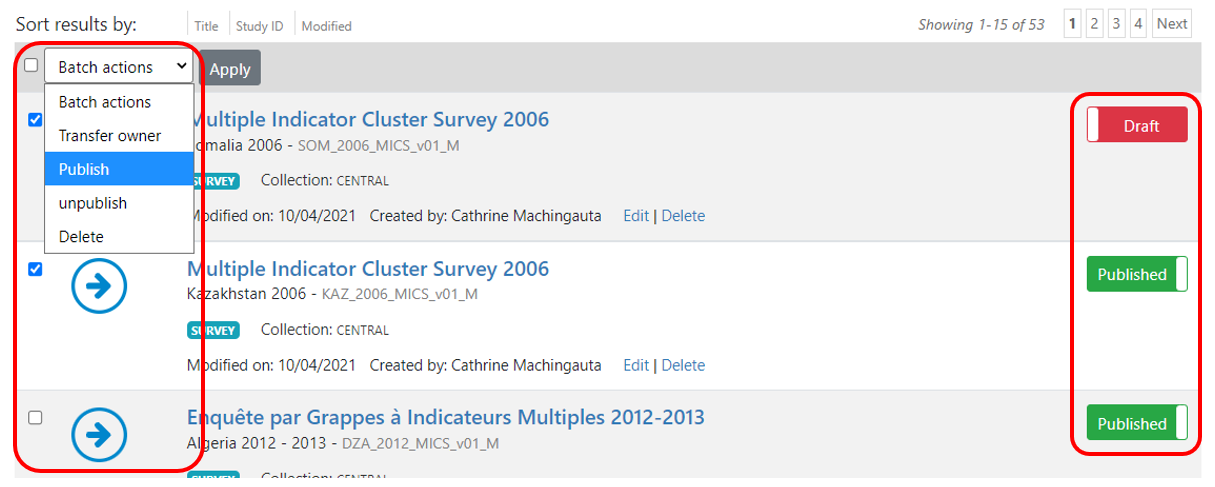
Publishing/unpublishing
Using the administrator interface
In the Manage studies page:


In the study page: