Installation (Linux server)
How to install NADA on a Linux server with Apache or NGINX, PHP, and MySQL 8.x or MariaDB 10.x+.
Before you start: Installation overview (requirements and folder layout).
For Microsoft SQL Server as the database, complete Install with SQL Server for the database steps, then continue from permissions onward here (or use Windows if the app server is IIS).
Pattern aligned with the Metadata Editor Linux installation.
Prerequisites
| Component | Version |
|---|---|
| OS | Ubuntu 20.04+, Debian 11+, RHEL/Rocky 8+, or similar |
| PHP | 7.4 minimum; 8.x recommended — mysqli, xsl, xml, mbstring |
| MySQL / MariaDB | 8.x / 10.x+ |
| Web server | Apache 2.4+ or NGINX (+ PHP-FPM for NGINX) |
Step 1: Install the stack
Debian / Ubuntu (Apache + MySQL example)
sudo apt update
sudo apt install apache2 mysql-server \
  php php-xsl php-xml php-mbstring php-mysql \
  libapache2-mod-php
# Or MariaDB instead of MySQL:
# sudo apt install mariadb-server
php -v
sudo systemctl enable --now apache2 mysql
Debian / Ubuntu (NGINX + PHP-FPM)
sudo apt update
sudo apt install nginx mysql-server \
  php-fpm php-xsl php-xml php-mbstring php-mysql
# Note the PHP-FPM socket, e.g. /var/run/php/php8.3-fpm.sock
php -v
sudo systemctl enable --now nginx php*-fpm mysql
RHEL / Rocky / Alma (outline)
Install httpd or nginx, php, php-mysqlnd (or equivalent), php-xml, php-mbstring, and mysql-server / mariadb-server via dnf. Enable and start the services. Extension package names vary by major version.
Confirm PHP meets the requirements. Tuning: PHP settings.
Step 2: Folder layout and download
sudo mkdir -p /var/www/nada
cd /var/www/nada
Application root must contain index.php (see folder layout).
Download options:
- Zip (recommended for production): download from NADA Releases, extract into
/var/www/nada. - Git: follow Install with Git, then continue from Step 3.
# Example zip flow
cd /tmp
# download nada-x.y.z.zip from GitHub Releases, then:
sudo unzip nada-*.zip -d /var/www/nada
# Ensure index.php is directly under /var/www/nada (adjust if the zip has a nested folder)
Prefer tagged releases over an arbitrary branch.
Step 3: Database (MySQL / MariaDB)
Create the database and configure database.php. Full reference: Configure MySQL / MariaDB.
sudo mysql -u root -pCREATE DATABASE nada CHARACTER SET utf8mb4 COLLATE utf8mb4_unicode_ci;
CREATE USER 'nada'@'localhost' IDENTIFIED BY 'yourpassword';
GRANT SELECT, INSERT, UPDATE, DELETE, CREATE, DROP, INDEX, ALTER,
CREATE TEMPORARY TABLES, LOCK TABLES ON nada.* TO 'nada'@'localhost';
FLUSH PRIVILEGES;
exitcd /var/www/nada
sudo cp application/config/database-sample.php application/config/database.php
sudo nano application/config/database.phpSet hostname, username, password, database, and dbdriver => mysqli. Example array: database.php.
TIP
Do not use the MySQL/MariaDB root account for the application in production.
Step 4: Permissions
The web server user needs write access to datafiles, files, and logs (create them if missing).
cd /var/www/nada
sudo mkdir -p datafiles files logs
sudo chown -R www-data:www-data .
sudo chmod -R 755 datafiles files logs
# Use 775 if your deployment needs group write| Distribution / stack | Typical user |
|---|---|
| Debian/Ubuntu Apache | www-data |
| RHEL Apache | apache |
| NGINX | nginx or www-data (check your unit) |
Security
After install, consider moving datafiles outside /var/www and pointing NADA at that path.
Step 5: Web server
Point the site document root at /var/www/nada (the folder with index.php), not an unrelated parent.
Apache
Enable rewrite if you will use Clean URLs:
sudo a2enmod rewriteExample site snippet (/etc/apache2/sites-available/nada.conf):
<VirtualHost *:80>
    ServerName catalog.example.org
    DocumentRoot /var/www/nada

    <Directory /var/www/nada>
        AllowOverride All
        Require all granted
    </Directory>

    ErrorLog ${APACHE_LOG_DIR}/nada-error.log
    CustomLog ${APACHE_LOG_DIR}/nada-access.log combined
</VirtualHost>sudo a2ensite nada.conf
sudo systemctl reload apache2NGINX
Example (adjust PHP-FPM socket for your PHP version):
server {
    listen 80;
    server_name catalog.example.org;
    root /var/www/nada;
    index index.php;

    location / {
        try_files $uri $uri/ /index.php?$query_string;
    }

    location ~ \.php$ {
        include snippets/fastcgi-php.conf;
        fastcgi_pass unix:/var/run/php/php8.3-fpm.sock;
    }
}sudo nginx -t && sudo systemctl reload nginxFor hiding index.php in the browser on Apache, see Clean URLs.
Step 6: Run the web installer
- Open
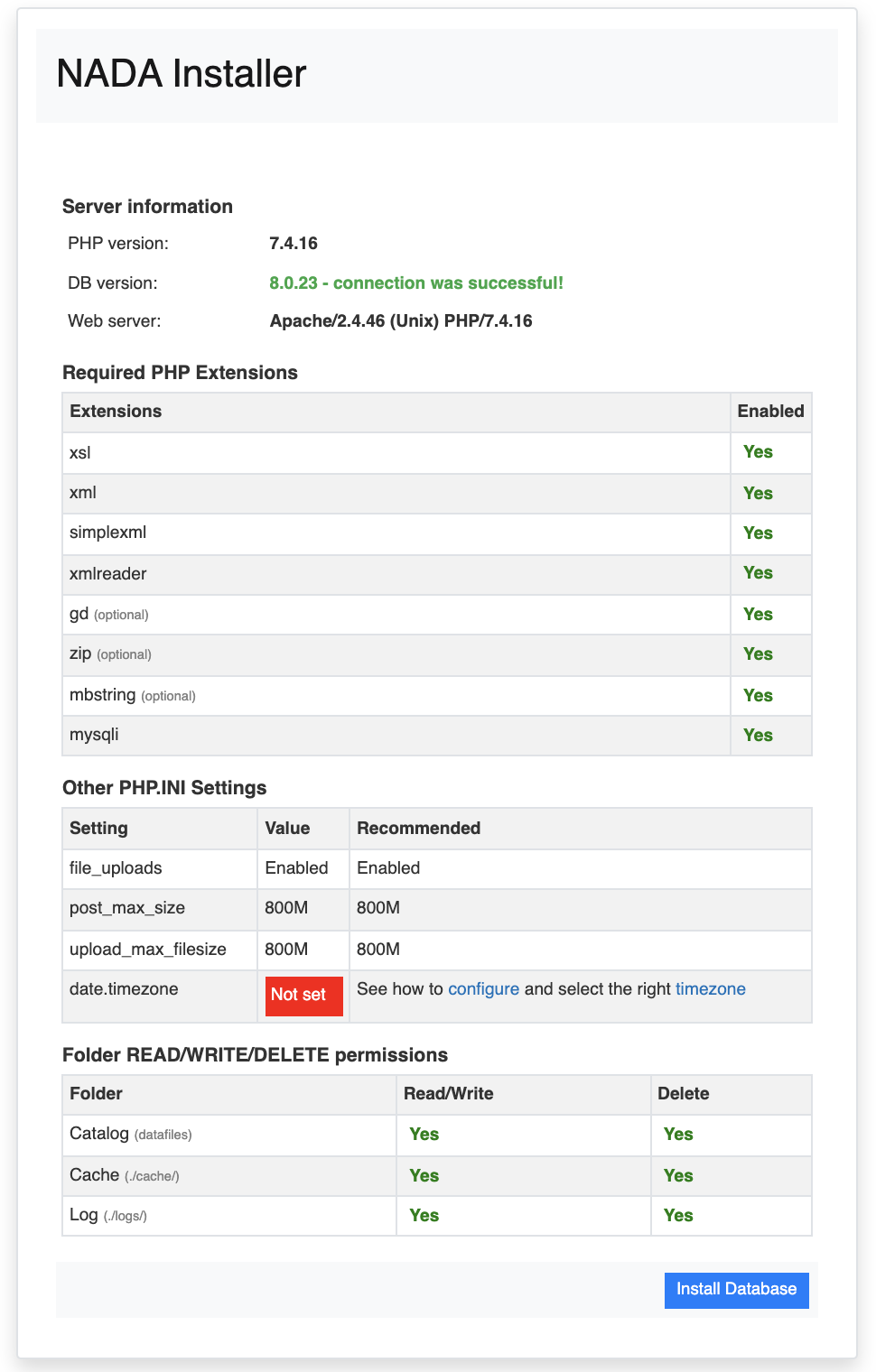
http://your-server/orhttp://your-server/nada(match your vhost/path). - Confirm every prerequisite check is green (PHP extensions, writable folders, database).
- Click Install Database and create the Site Administrator account.
Complex password
Use at least 12 characters with uppercase, numbers, and punctuation. Do not lose this account.
If checks fail, see PHP settings and Debug.
Step 7: Post-install
- Email — required for registration and many access workflows
- Other Configurations (captcha, themes, CSP, Clean URLs)
- Optional: Solr
- Getting started
Hardening
- Dedicated DB user (not
root) - Strong admin password
- Delete any temporary
info.php - Move
datafilesoutside the web root when possible - Plan database and file backups
Troubleshooting
| Issue | What to check |
|---|---|
| Blank page / 500 | PHP/apache/nginx error logs; Debug; logs/ writable |
| 502 (NGINX) | PHP-FPM running; socket path in site config |
| Installer cannot write | Ownership on datafiles, files, logs |
| Database connection failed | database.php; MySQL/MariaDB listening; user grants |
| Missing PHP extension | Packages / phpenmod; restart Apache or php-fpm |