Adding scripts

Documenting, cataloguing and disseminating data has the potential to increase the volume and diversity of data analysis. There is also much value in documenting, cataloguing and disseminating data processing and analysis scripts. There are multiple reasons to include reproducibility, replicability, and auditability of data analytics as a component of a data dissemination system. They include:
- Improve the quality of research and analytical work. Public scrutiny enables contestability and independent quality control; it is a strong incentive for additional rigor.
- Allow the re-purposing or expansion of analytical work by the research community, thereby increasing its relevance, utility and value of both the data and of the analytical work that makes use of them.
- Protect the reputation and credibility of the analysis.
- Provide students and researchers with useful training and reference materials on socio-economic development analysis.
- Satisfy a requirement imposed by peer reviewed journals or financial sponsors of research.
Technological solutions such as GitHub, Jupyter Notebooks and Jupiter Lab have been developed to facilitate the preservation, versioning, and sharing of code, and to enable collaborative work around data analysis. And recommendations and style guides have been produced to foster usability, adaptability, and reproducibility of code. But these solutions do not fully address the issue of discoverability of data analysis scripts, which requires better documentation and cataloguing solutions. We therefore propose --as a complement to existing solutions-- a metadata schema to document data analysis projects and the related scripts. The production of structured metadata will contribute not only to discoverability, but also to the reproducibility, replicability, and auditability of data analytics.
Metadata schema
For documenting scripts/research projects, NADA uses a metadata schema developed by the World Bank Development Data Group.
The documentation of the script metadata schema is available at https://ihsn.github.io/nada-api-redoc/catalog-admin/#tag/Scripts. A Schema Guide is also available, which provides more detailed information on the structure, content, and use of the metadata standards and schemas.
Loading metadata (web interface)
This option is currently not available. It will be added in a future version of NADA.
From scratch (web interface)
You have the possibility to create a new script entry in the NADA administrator web interface, using the embedded metadata editor. A script entry is used to document and publish all scripts related to one same data processing and/or ananlysis project that involves scripts written in any programming language (R, Python, Stata, SPSS, SAS, other, or a combination of them). The objective of documenting and publishing scripts is to make research and analysis fully transparent, reproducible, and replicable. Ideally, the data that serve as input the the scripts, and the publications that are the output of the analysis, will also be documented and published in the catalog (as microdata, indicators, documents, tables, or other).
To document a research project (scripts) from scratch using the web interface, select "Add study" in the dashboard page, then select the option script in the Create new study box. Then click Create.
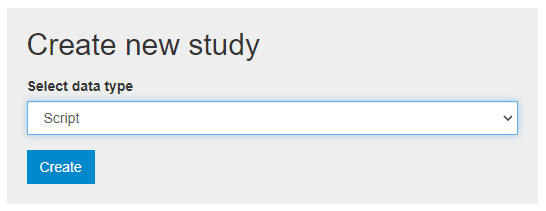
The Overview tab of a new, empty entry will be displayed. Click on the Metadata tab. The metadata editor embedded in NADA will be displayed, providing a form compliant with the NADA metadata schema for documenting data processing and analysis projects. After filling out the fields with as much detail as possible, click on Save.
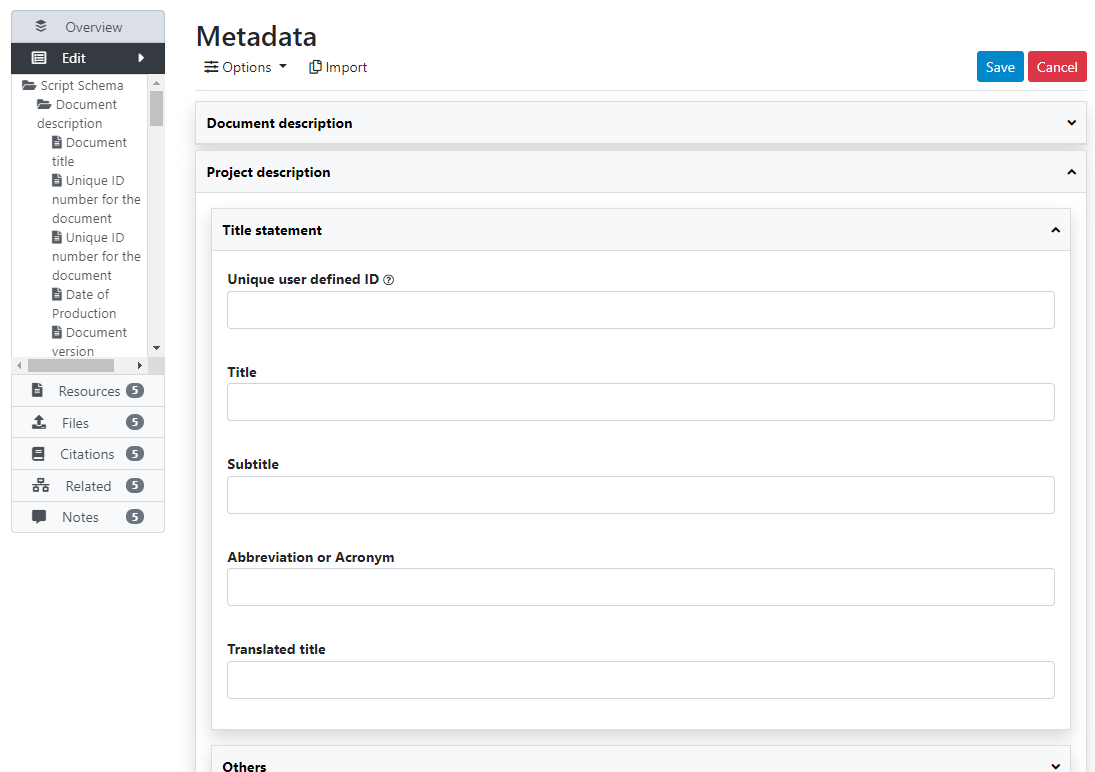
Once you have entered and saved metadata, proceed as explained in previous section to upload files, select options, add a thumbnail, and publish your metadata. To add external resources, use the Add resource in the External resources page.
Loading metadata (API)
This option is currently not available. It will be added in a future version of NADA.
From scratch (API)
You can generate the metadata using R or Python, then publish it using the NADA API and the NADAR package or PyNADA library.