Community
Use the NADA GitHub repository to follow releases, report problems, and suggest improvements.
Get notifications from GitHub
GitHub can notify you about activity on the NADA repository, including new releases.
- Open https://github.com/ihsn/nada.
- Click Watch near the top of the page (it may show Unwatch if you already follow the repository).
- Choose All Activity.
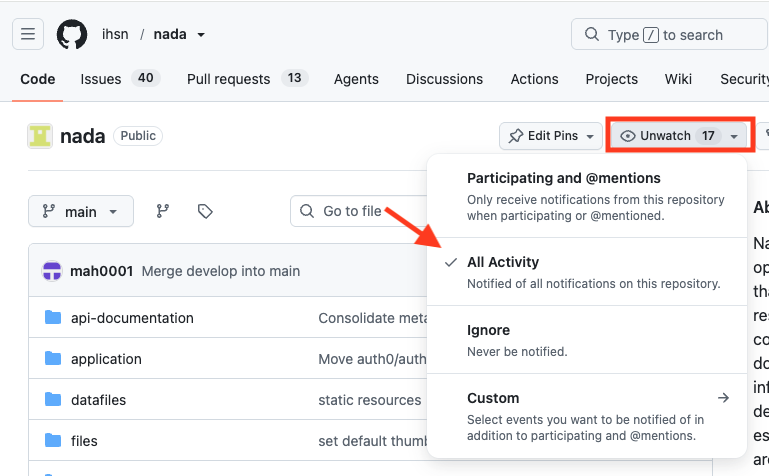
This is the simplest option: you will be notified about releases, issues, pull requests, and other repository activity.
If you only want emails about new NADA versions, choose Custom in the same menu, select Releases, then click Apply.
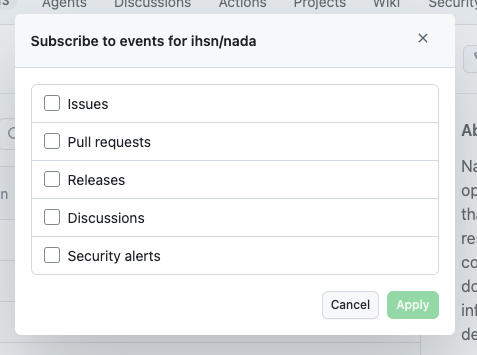
You can change or turn off Watch settings at any time from the Watch menu.
Star vs Watch
| Action | What it does |
|---|---|
| Watch → All Activity | Notifies you about releases and other repository activity (easiest option) |
| Watch → Custom → Releases | Notifies you only when a new version is published |
| Star | Bookmarks the repository on your GitHub account. It does not send emails |
Releases and downloads
Published versions, release notes, and downloadable packages are listed on the NADA releases page.
Report a bug
If something does not work as expected:
- Check existing issues to see if it was already reported.
- Open a new issue on GitHub.
- Include the NADA version, your environment (OS, PHP, database), and steps to reproduce the problem.
Suggest a feature
To propose an enhancement or new capability, open a GitHub issue and describe:
- The problem you are trying to solve
- Who would benefit
- Any ideas for how it could work
Clear use cases help maintainers prioritize requests.
Documentation
Improvements to this documentation site are welcome in the nada-documentation repository — including fixes, clarifications, and new examples.
Contact
You can also contact the NADA team at datatools@worldbank.org.