Adding a table

Metadata schema
For documenting tables, NADA makes use of a metadata schema developed by the World Bank Development Data Group.
The documentation of the table metadata schema is available at https://ihsn.github.io/nada-api-redoc/catalog-admin/#tag/Tables. A Schema Guide is also available, which provides more detailed information on the structure, content, and use of the metadata standards and schemas.
Loading metadata (web interface)
This option is currently not available. It will be added in a future version of NADA.
From scratch (web interface)
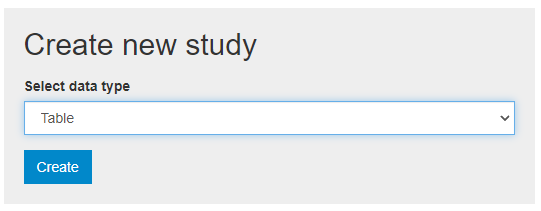
You can create, document, and publish a table using the metadata editor embedded in NADA. To do so, login as administrator, then in the login sub-menu, select Site administration. In the Studies menu, select Manage studies / Central Data Catalog (or another collection), then click on Add study. In the Create new study box, select Table.
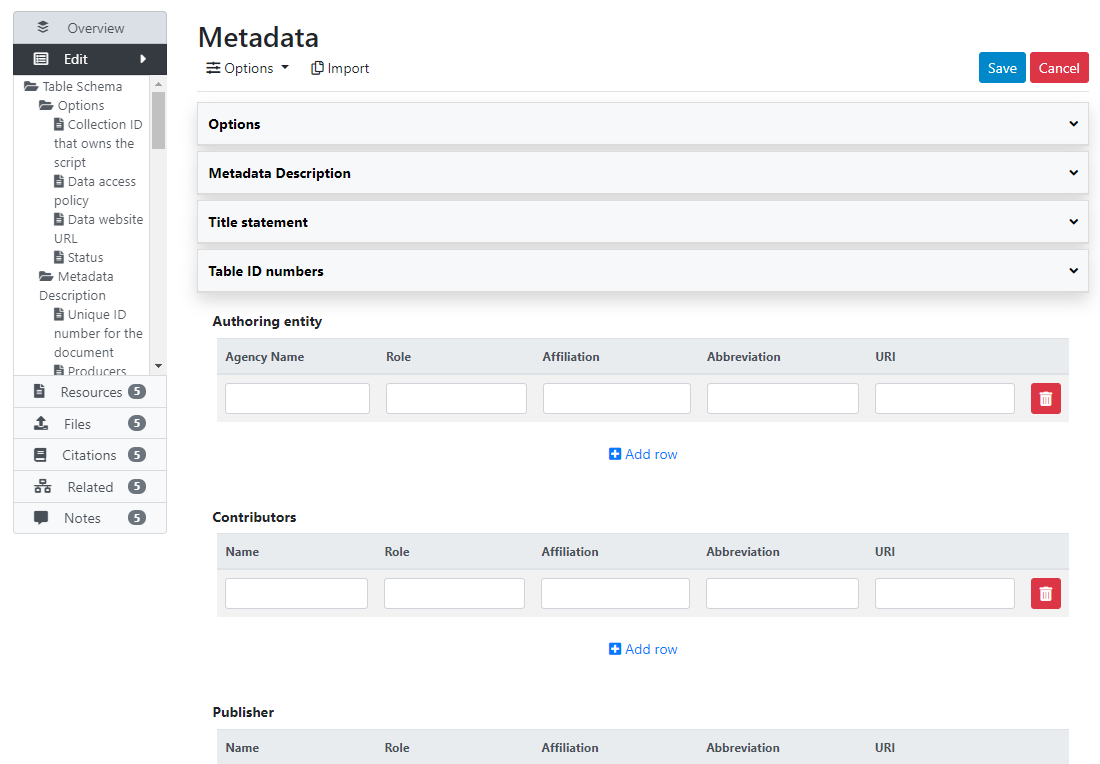
Click on Metadata. In the metadata editor form, enter all available information to describe the table, then click on the Save button.
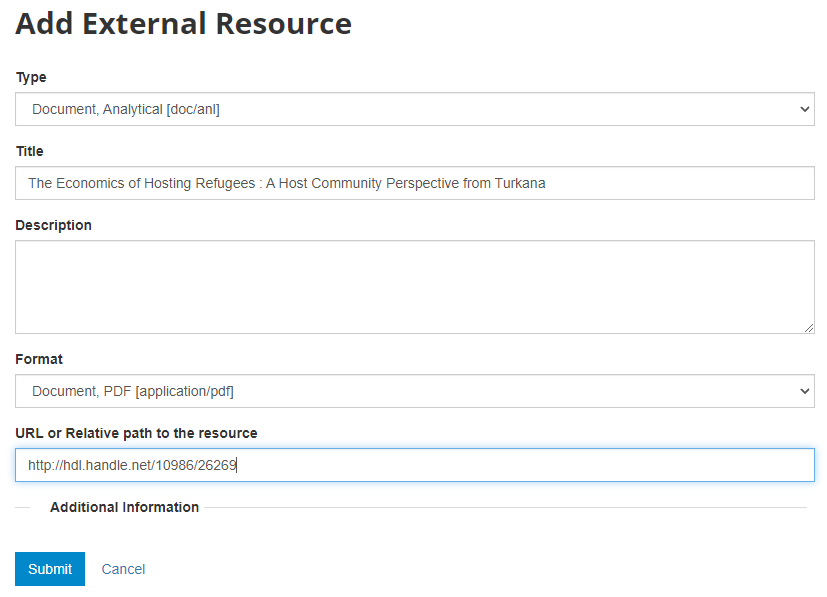
What has been done so far is generating and publishing the table description in the catalog. We have not provided any link to the table, or uploaded the table file to the web server (e.g. as an XLS file, or as a PDF file). Click Add new resource and provide information on the type of resource (in this case a table). Click Submit. @@@@@@@ provide URL or filename/path.
Now the table metadata and the link to the table are both provided. But the entry is still in draft mode (i.e. only visible to administrators); to make it visible to users, change its staus to "Published".
Loading metadata (API)
This option is currently not available. It will be added in a future version of NADA.
From scratch (API)
You can generate the metadata using R or Python, then publish it using the NADA API and the NADAR package or PyNADA library.
We provide here an example of R and Python scripts in which a collection of tables ("Country profiles") from the World Bank's World Development Indicators (WDI) are published and publish in a NADA catalog. These tables are published by the World Bank and made available in CSV, XLS and PDF formats. See "COUNTRY PROFILES" at http://wdi.worldbank.org/table. The table is available separately for the world and for geographic regions, country groups (income level, etc), and country. The same metadata apply to all, except for the country tables. We therefore generate the metadata once, and use a function to publish all tables in a loop. In this example, we only publish tables for world, WB operations geographic regions, and countries of South Asia. This will result in publishing 15 tables. We could provide the list of all countries to the loop to publish 200+ tables. The example shows the advantage that R or Python (and the NADA API) provide for automating data documentation and publishing tasks.
When documenting a table using R or Python, the table metadata must be structured using a schema described in https://ihsn.github.io/nada-api-redoc/catalog-admin/#tag/Tables.
# ==============================================================================
# NADA Demo Catalog - Use of API examples                      Use case ID: 013
#
# Use case description: document a collection of tables ("Country profiles")
# from the World Bank's World Development Indicators (WDI), and publish them in
# a NADA catalog. The tables are published by the World Bank and made available
# in CSV, XLS and PDF formats. See "COUNTRY PROFILES" at
#    http://wdi.worldbank.org/table
#
# The table is available separately for the world and for geographic regions,
# country groups (income level, etc), and country. The same metadata apply to
# all, except for the country tables. We therefore generate the metadata once,
# and use a function to publish all tables in a loop.
#
# In this example, we only publish tables for world, WB operations geographic
# regions, and countries of South Asia. This will result in publishing 15 tables.
# We could provide the list of all countries to the loop to publish 200+ tables.
#
# The published metadata will be structured using a schema described in:
#    https://ihsn.github.io/nada-api-redoc/catalog-admin/#tag/Tables
#
# Script tested with NADA version: 5.0
# Date: 2021-09-14
# See output in http://nada-demo.ihsn.org/index.php/catalog
#
#   ** This script requires a valid API key with administrator privileges.**
#
# ==============================================================================

library(nadar)
library(jsonlite)
library(httr)
library(rlist)

# Set API key (stored in a CSV file; not to be entered in clear) and catalog URL

my_keys <- read.csv("C:/CONFIDENTIAL/my_keys.csv", header=F, stringsAsFactors=F)
set_api_key(my_keys[5,1])  # Assuming the key is in cell A5
set_api_url("http://nada-demo.ihsn.org/index.php/api/")
set_api_verbose(FALSE)

thumb_file <- "E:/demo_nada_files/UC013/WB_country_profiles_WLD.jpg"

src_data <- "World Bank, World Development Indicators database - WDI Central, 2021"

# The tables contain data extracted from WDI time series. We identified these
# series ID and list them in their order of appearance in the table.
# We then use the WDI API to retrieve information on the series (name, label,
# definition) which we will include in the published metadata.

tbl_series = list("SP.POP.TOTL", "SP.POP.GROW", "AG.SRF.TOTL.K2", "EN.POP.DNST",
                  "SI.POV.NAHC", "SI.POV.DDAY", "NY.GNP.ATLS.CD", "NY.GNP.PCAP.CD",
                  "NY.GNP.MKTP.PP.CD", "NY.GNP.PCAP.PP.CD", "SI.DST.FRST.20",
                  "SP.DYN.LE00.IN", "SP.DYN.TFRT.IN", "SP.ADO.TFRT", "SP.DYN.CONU.ZS",
                  "SH.STA.BRTC.ZS", "SH.DYN.MORT", "SH.STA.MALN.ZS", "SH.IMM.MEAS",
                  "SE.PRM.CMPT.ZS", "SE.PRM.ENRR", "SE.SEC.ENRR", "SE.ENR.PRSC.FM.ZS",
                  "SH.DYN.AIDS.ZS", "AG.LND.FRST.K2", "ER.PTD.TOTL.ZS",
                  "ER.H2O.FWTL.ZS", "SP.URB.GROW", "EG.USE.PCAP.KG.OE",
                  "EN.ATM.CO2E.PC", "EG.USE.ELEC.KH.PC", "NY.GDP.MKTP.CD",
                  "NY.GDP.MKTP.KD.ZG", "NY.GDP.DEFL.KD.ZG", "NV.AGR.TOTL.ZS",
                  "NV.IND.TOTL.ZS", "NE.EXP.GNFS.ZS", "NE.IMP.GNFS.ZS",
                  "NE.GDI.TOTL.ZS", "GC.REV.XGRT.GD.ZS", "GC.NLD.TOTL.GD.ZS",
                  "FS.AST.DOMS.GD.ZS", "GC.TAX.TOTL.GD.ZS", "MS.MIL.XPND.GD.ZS",
                  "IT.CEL.SETS.P2", "IT.NET.USER.ZS", "TX.VAL.TECH.MF.ZS",
                  "IQ.SCI.OVRL", "TG.VAL.TOTL.GD.ZS", "TT.PRI.MRCH.XD.WD",
                  "DT.DOD.DECT.CD", "DT.TDS.DECT.EX.ZS", "SM.POP.NETM",
                  "BX.TRF.PWKR.CD.DT", "BX.KLT.DINV.CD.WD", "DT.ODA.ODAT.CD")

rows = list()
defs = list()

for(s in tbl_series) {

  url = paste0("https://api.worldbank.org/v2/sources/2/series/", s,
               "/metadata?format=JSON")
  s_meta <- GET(url)
  if(http_error(s_meta)){
    stop("The request failed")
  } else {
    s_metadata <- fromJSON(content(s_meta, as = "text"))
    s_metadata <- s_metadata$source$concept[[1]][[2]][[1]][[2]][[1]]
  }

  indic_lbl = s_metadata$value[s_metadata$id=="IndicatorName"]
  indic_def = s_metadata$value[s_metadata$id=="Longdefinition"]

  this_row = list(var_name = s, dataset = src_data, label = indic_lbl)
  rows = list.append(rows, this_row)

  this_def = list(name = indic_lbl, definition = indic_def)
  defs = list.append(defs, this_def)

}

# ------------------------------------------------------------------------------
# We create a function that takes two parameters: the country (or region)
# name, and the country (or region) code. This function will generate the
# table metadata and publish the selected table in the NADA catalog.
# ------------------------------------------------------------------------------

publish_country_profile <- function(country_name, country_code) {

  # Generate the country/region-specific unique table ID and table title
  idno_tbl  <- paste0("UC013_", country_code)
  tbl_title <- paste0("World Development Indicators, Country Profile, ",
                      country_name, " - 2021")
  citation  <- paste("World Bank,", tbl_title,
                     ", https://datacatalog.worldbank.org/dataset/country-profiles, accessed on [date]")

  # Generate the schema-compliant metadata

  my_tbl <- list(

    metadata_information = list(
      producers = list(list(name = "NADA team")),
      production_date = "2021-09-14",
      version = "v01"
    ),

    table_description = list(

      title_statement = list(
        idno = idno_tbl,
        title = tbl_title
      ),

      authoring_entity = list(
        list(name = "World Bank, Development Data Group",
             abbreviation = "WB",
             uri = "https://data.worldbank.org/")
      ),

      date_created = "2021-07-03",
      date_published = "2021-07",

      description = "Country profiles present the latest key development data drawn from the World Development Indicators (WDI) database. They follow the format of The Little Data Book, the WDI's quick reference publication.",

      table_columns = list(
        list(label = "Year 1990"),
        list(label = "Year 2000"),
        list(label = "Year 2010"),
        list(label = "Year 2018")
      ),

      table_rows = rows,

      table_series = list(
        list(name = "World Development Indicators, Country Profiles",
             maintainer = "World Bank, Development Data Group (DECDG)")
      ),

      data_sources = list(
        list(source = src_data)
      ),

      time_periods = list(
        list(from = "1990", to = "1990"),
        list(from = "2000", to = "2000"),
        list(from = "2010", to = "2010"),
        list(from = "2018", to = "2018")
      ),

      ref_country = list(
        list(name = country_name, code = country_code)
      ),

      geographic_granularity = area,

      languages = list(
        list(name = "English", code = "EN")
      ),

      links = list(
        list(uri = "https://datacatalog.worldbank.org/dataset/country-profiles",
             description = "Country Profiles in World Bank Data Catalog website"),
        list(uri = "http://wdi.worldbank.org/tables",
             description = "Country Profiles in World Bank Word Development Indicators website"),
        list(uri = "https://datatopics.worldbank.org/world-development-indicators/",
             description = "Word Development Indicators website")
      ),

      keywords = list(
        list(name = "World View"),
        list(name = "People"),
        list(name = "Environment"),
        list(name = "Economy"),
        list(name = "States and markets"),
        list(name = "Global links")
      ),

      topics = list(
        list(id = "1", name = "Demography",
             vocabulary = "CESSDA",
             uri = "https://vocabularies.cessda.eu/vocabulary/TopicClassification"),
        list(id = "2", name = "Economics",
             vocabulary = "CESSDA",
             uri = "https://vocabularies.cessda.eu/vocabulary/TopicClassification"),
        list(id = "3", name = "Education",
             vocabulary = "CESSDA",
             uri = "https://vocabularies.cessda.eu/vocabulary/TopicClassification"),
        list(id = "4", name = "Health",
             vocabulary = "CESSDA",
             uri = "https://vocabularies.cessda.eu/vocabulary/TopicClassification"),
        list(id = "5", name = "Labour And Employment",
             vocabulary = "CESSDA",
             uri = "https://vocabularies.cessda.eu/vocabulary/TopicClassification"),
        list(id = "6", name = "Natural Environment",
             vocabulary = "CESSDA",
             uri = "https://vocabularies.cessda.eu/vocabulary/TopicClassification"),
        list(id = "7", name = "Social Welfare Policy And Systems",
             vocabulary = "CESSDA",
             uri = "https://vocabularies.cessda.eu/vocabulary/TopicClassification"),
        list(id = "8", name = "Trade Industry And Markets",
             vocabulary = "CESSDA",
             uri = "https://vocabularies.cessda.eu/vocabulary/TopicClassification"),
        list(id = "9", name = "Economic development")
      ),

      definitions = defs,

      license  = list(
        list(name = "Creative Commons - Attribution 4.0 International - CC BY 4.0",
             uri = "https://creativecommons.org/licenses/by/4.0/")
      ),

      citation = citation,

      contacts = list(
        list(name = "World Bank, Development Data Group, Help Desk",
             telephone = "+1 (202) 473-7824 or +1 (800) 590-1906",
             email = "data@worldbank.org",
             uri = "https://datahelpdesk.worldbank.org/")
      )
    )
  )

  # Publish the table in the NADA catalog

  table_add(idno = my_tbl$table_description$title_statement$idno,
            metadata = my_tbl,
            repositoryid = "central",
            published = 1,
            overwrite = "yes",
            thumbnail = thumb_file)

  # Although the metadata provides links, we also add a link to the table as an
  # external resource; this will result in a "DOWNLOAD" button being shown in
  # the NADA catalog page for the table.

  external_resources_add(
    idno = my_tbl$table_description$title_statement$idno,
    title = "World Development Indicators, Country Profiles",
    dctype = "tbl",
    file_path = "https://databank.worldbank.org/views/reports/reportwidget.aspx?Report_Name=CountryProfile&Id=b450fd57&tbar=y&dd=y&inf=n&zm=n",
    overwrite = "yes"
  )

}

# ------------------------------------------------------------------------------
# Run the function in a loop to publish selected tables
# ------------------------------------------------------------------------------

# List of regions and countries (and corresponding codes)
# We also include the geographic area type.

geo_list <- list(
  list(name = "World",                        code = "WLD", area = "World"),
  list(name = "East Asia and Pacific",        code = "EAP", area = "Region"),
  list(name = "Europe and Central Asia",      code = "ECA", area = "Region"),
  list(name = "Latin America and Caribbean",  code = "LAC", area = "Region"),
  list(name = "Middle East and North Africa", code = "MNA", area = "Region"),
  list(name = "South Asia",                   code = "SAR", area = "Region"),
  list(name = "Sub-Saharan Africa",           code = "AFR", area = "Region"),
  list(name = "Afghanistan",                  code = "AFG", area = "Country"),
  list(name = "Bangladesh",                   code = "BGD", area = "Country"),
  list(name = "Bhutan",                       code = "BHU", area = "Country"),
  list(name = "India",                        code = "IND", area = "Country"),
  list(name = "Maldives",                     code = "MDV", area = "Country"),
  list(name = "Nepal",                        code = "NPL", area = "Country"),
  list(name = "Pakistan",                     code = "PAK", area = "Country"),
  list(name = "Sri Lanka",                    code = "LKA", area = "Country"))

# Loop through the list to publish the tables

for(i in 1:length(geo_list)) {
  area <- as.character(geo_list[[i]][3])
  publish_country_profile(
    country_name = as.character(geo_list[[i]][1]),
    country_code = as.character(geo_list[[i]][2]))
}# ==============================================================================
# NADA Demo Catalog - Use of API examples Use case ID: 013
#
# Use case description: document a collection of tables ("Country profiles")
# from the World Bank's World Development Indicators (WDI), and publish them in
# a NADA catalog. The tables are published by the World Bank and made available
# in CSV, XLS and PDF formats. See "COUNTRY PROFILES" at
# http://wdi.worldbank.org/table
#
# The table is available separately for the world and for geographic regions,
# country groups (income level, etc), and country. The same metadata apply to
# all, except for the country tables. We therefore generate the metadata once,
# and use a function to publish all tables in a loop.
#
# In this example, we only publish tables for world, WB operations geographic
# regions, and countries of South Asia. This will result in publishing 15 tables.
# We could provide the list of all countries to the loop to publish 200+ tables.
#
# The published metadata will be structured using a schema described in:
# https://ihsn.github.io/nada-api-redoc/catalog-admin/#tag/Tables
#
# Script tested with NADA version: 5.0
# Date: 2021-09-14
# See output in http://nada-demo.ihsn.org/index.php/catalog
#
# ** This script requires a valid API key with administrator privileges.**
#
# ==============================================================================
import pynada as nada
import pandas as pd
import urllib.request
import json
# Set API key (stored in a CSV file; not to be entered in clear) and catalog URL
my_keys = pd.read_csv("../confidential/my_keys.csv", header=None)
nada.set_api_key(my_keys.iat[4, 0]) # Assuming the key is in cell A5
nada.set_api_url('https://nada-demo.ihsn.org/index.php/api/')
thumb_file = "demo_nada_files/UC013/WB_country_profiles_WLD.jpg"
src_data = "World Bank, World Development Indicators database - WDI Central, 2021"
# The tables contain data extracted from WDI time series. We identified these
# series ID and list them in their order of appearance in the table.
# We then use the WDI API to retrieve information on the series (name, label,
# definition) which we will include in the published metadata.
tbl_series = ["SP.POP.TOTL", "SP.POP.GROW", "AG.SRF.TOTL.K2", "EN.POP.DNST",
"SI.POV.NAHC", "SI.POV.DDAY", "NY.GNP.ATLS.CD", "NY.GNP.PCAP.CD",
"NY.GNP.MKTP.PP.CD", "NY.GNP.PCAP.PP.CD", "SI.DST.FRST.20",
"SP.DYN.LE00.IN", "SP.DYN.TFRT.IN", "SP.ADO.TFRT", "SP.DYN.CONU.ZS",
"SH.STA.BRTC.ZS", "SH.DYN.MORT", "SH.STA.MALN.ZS", "SH.IMM.MEAS",
"SE.PRM.CMPT.ZS", "SE.PRM.ENRR", "SE.SEC.ENRR", "SE.ENR.PRSC.FM.ZS",
"SH.DYN.AIDS.ZS", "AG.LND.FRST.K2", "ER.PTD.TOTL.ZS",
"ER.H2O.FWTL.ZS", "SP.URB.GROW", "EG.USE.PCAP.KG.OE",
"EN.ATM.CO2E.PC", "EG.USE.ELEC.KH.PC", "NY.GDP.MKTP.CD",
"NY.GDP.MKTP.KD.ZG", "NY.GDP.DEFL.KD.ZG", "NV.AGR.TOTL.ZS",
"NV.IND.TOTL.ZS", "NE.EXP.GNFS.ZS", "NE.IMP.GNFS.ZS",
"NE.GDI.TOTL.ZS", "GC.REV.XGRT.GD.ZS", "GC.NLD.TOTL.GD.ZS",
"FS.AST.DOMS.GD.ZS", "GC.TAX.TOTL.GD.ZS", "MS.MIL.XPND.GD.ZS",
"IT.CEL.SETS.P2", "IT.NET.USER.ZS", "TX.VAL.TECH.MF.ZS",
"IQ.SCI.OVRL", "TG.VAL.TOTL.GD.ZS", "TT.PRI.MRCH.XD.WD",
"DT.DOD.DECT.CD", "DT.TDS.DECT.EX.ZS", "SM.POP.NETM",
"BX.TRF.PWKR.CD.DT", "BX.KLT.DINV.CD.WD", "DT.ODA.ODAT.CD"]
rows = []
defs = []
for s in tbl_series:
url = "https://api.worldbank.org/v2/sources/2/series/" + s + "/metadata?format=JSON"
try:
s_meta = urllib.request.urlopen(url)
except Exception as e:
print(f"The request failed - {e}")
exit()
s_metadata = json.loads(s_meta.read())
s_metadata = s_metadata['source'][0]['concept'][0]['variable'][0]['metatype']
indic_lbl = next(m['value'] for m in s_metadata if m["id"] == "IndicatorName")
indic_def = next(m['value'] for m in s_metadata if m["id"] == "Longdefinition")
this_row = {'var_name': s, 'dataset': src_data, 'label': indic_lbl}
rows.append(this_row)
this_def = {'name': indic_lbl, 'definition': indic_def}
defs.append(this_def)
# ------------------------------------------------------------------------------
# We create a function that takes two parameters: the country (or region)
# name, and the country (or region) code. This function will generate the
# table metadata and publish the selected table in the NADA catalog.
# ------------------------------------------------------------------------------
def publish_country_profile(country_name, country_code):
# Generate the country/region-specific unique table ID and table title
idno_tbl = "UC013_" + country_code
tbl_title = "World Development Indicators, Country Profile, " + country_name + " - 2021"
citation = "World Bank," + tbl_title + \
", https://datacatalog.worldbank.org/dataset/country-profiles, " \
"accessed on [date]"
# Generate the schema-compliant metadata
metadata_information = {
'producers': [{'name': "NADA team"}],
'production_date': "2021-09-14",
'version': "v01"
}
table_description = {
'title_statement': {
'idno': idno_tbl,
'title': tbl_title
},
'authoring_entity': [
{
'name': "World Bank, Development Data Group",
'abbreviation': "WB",
'uri': "https://data.worldbank.org/"
}
],
'date_created': "2021-07-03",
'date_published': "2021-07",
'description': "Country profiles present the latest key development data "
"drawn from the World Development Indicators (WDI) database. "
"They follow the format of The Little Data Book, the "
"WDI's quick reference publication.",
'table_columns': [
{'label': "Year 1990"},
{'label': "Year 2000"},
{'label': "Year 2010"},
{'label': "Year 2018"}
],
'table_rows': rows,
'table_series': [
{
'name': "World Development Indicators, Country Profiles",
'maintainer': "World Bank, Development Data Group (DECDG)"}
],
'data_sources': [{'source': src_data}],
'time_periods': [{'from': "1990", 'to': "1990"},
{'from': "2000", 'to': "2000"},
{'from': "2010", 'to': "2010"},
{'from': "2018", 'to': "2018"}],
'ref_country': [{'name': country_name, 'code': country_code}],
'geographic_granularity': area,
'languages': [{'name': "English", 'code': "EN"}],
'links': [
{
'uri': "https://datacatalog.worldbank.org/dataset/country-profiles",
'description': "Country Profiles in World Bank Data Catalog website"},
{
'uri': "http://wdi.worldbank.org/tables",
'description': "Country Profiles in World Bank Word Development "
"Indicators website"},
{
'uri': "https://datatopics.worldbank.org/world-development-indicators/",
'description': "Word Development Indicators website"}
],
'keywords': [
{'name': "World View"},
{'name': "People"},
{'name': "Environment"},
{'name': "Economy"},
{'name': "States and markets"},
{'name': "Global links"}
],
'topics': [
{
'id': "1", 'name': "Demography",
'vocabulary': "CESSDA",
'uri': "https://vocabularies.cessda.eu/vocabulary/TopicClassification"},
{
'id': "2", 'name': "Economics",
'vocabulary': "CESSDA",
'uri': "https://vocabularies.cessda.eu/vocabulary/TopicClassification"},
{
'id': "3", 'name': "Education",
'vocabulary': "CESSDA",
'uri': "https://vocabularies.cessda.eu/vocabulary/TopicClassification"},
{
'id': "4", 'name': "Health",
'vocabulary': "CESSDA",
'uri': "https://vocabularies.cessda.eu/vocabulary/TopicClassification"},
{
'id': "5", 'name': "Labour And Employment",
'vocabulary': "CESSDA",
'uri': "https://vocabularies.cessda.eu/vocabulary/TopicClassification"},
{
'id': "6", 'name': "Natural Environment",
'vocabulary': "CESSDA",
'uri': "https://vocabularies.cessda.eu/vocabulary/TopicClassification"},
{
'id': "7", 'name': "Social Welfare Policy And Systems",
'vocabulary': "CESSDA",
'uri': "https://vocabularies.cessda.eu/vocabulary/TopicClassification"},
{
'id': "8", 'name': "Trade Industry And Markets",
'vocabulary': "CESSDA",
'uri': "https://vocabularies.cessda.eu/vocabulary/TopicClassification"},
{'id': "9", 'name': "Economic development"}
],
'definitions': defs,
'license': [
{
'name': "Creative Commons - Attribution 4.0 International - CC BY 4.0",
'uri': "https://creativecommons.org/licenses/by/4.0/"}
],
'citation': citation,
'contacts': [
{
'name': "World Bank, Development Data Group, Help Desk",
'telephone': "+1 (202) 473-7824 or +1 (800) 590-1906",
'email': "data@worldbank.org",
'uri': "https://datahelpdesk.worldbank.org/"}
]
}
# Publish the table in the NADA catalog
nada.create_table_dataset(
dataset_id=table_description['title_statement']['idno'],
repository_id="central",
published=1,
overwrite="yes",
metadata_information=metadata_information,
table_description=table_description,
thumbnail=thumb_file
)
# Although the metadata provides links, we also add a link to the table as an
# external resource; this will result in a "DOWNLOAD" button being shown in
# the NADA catalog page for the table.
nada.add_resource(
dataset_id=table_description['title_statement']['idno'],
dctype="tbl",
title="World Development Indicators, Country Profiles",
file_path="https://databank.worldbank.org/views/reports/reportwidget.aspx?Report_Name=CountryProfile&Id"
"=b450fd57&tbar=y&dd=y&inf=n&zm=n",
overwrite="yes"
)
# ------------------------------------------------------------------------------
# Run the function in a loop to publish selected tables
# ------------------------------------------------------------------------------
# List of regions and countries (and corresponding codes)
# We also include the geographic area type.
geo_list = [
{'name': "World", 'code': "WLD", 'area': "World"},
{'name': "East Asia and Pacific", 'code': "EAP", 'area': "Region"},
{'name': "Europe and Central Asia", 'code': "ECA", 'area': "Region"},
{'name': "Latin America and Caribbean", 'code': "LAC", 'area': "Region"},
{'name': "Middle East and North Africa", 'code': "MNA", 'area': "Region"},
{'name': "South Asia", 'code': "SAR", 'area': "Region"},
{'name': "Sub-Saharan Africa", 'code': "AFR", 'area': "Region"},
{'name': "Afghanistan", 'code': "AFG", 'area': "Country"},
{'name': "Bangladesh", 'code': "BGD", 'area': "Country"},
{'name': "Bhutan", 'code': "BHU", 'area': "Country"},
{'name': "India", 'code': "IND", 'area': "Country"},
{'name': "Maldives", 'code': "MDV", 'area': "Country"},
{'name': "Nepal", 'code': "NPL", 'area': "Country"},
{'name': "Pakistan", 'code': "PAK", 'area': "Country"},
{'name': "Sri Lanka", 'code': "LKA", 'area': "Country"}
]
# Loop through the list to publish the tables
for i in range(len(geo_list)):
area = str(geo_list[i]['area'])
publish_country_profile(country_name=geo_list[i]['name'],
country_code=geo_list[i]['code'])Making the data accessible via API
@@@@ Content of table can be published and made accessible via API. See section ...
Adding data visualizations
@@@
Adding a data preview
@@@