Adding a document

Metadata standard: Dublin Core
For documents, NADA makes use of the Dublin Core metadata standard, augmented with a few elements inspired by the MARC21 standard.
The documentation of the Dublin Core metadata standard (as implemented in NADA for documenting publications) is available at https://ihsn.github.io/nada-api-redoc/catalog-admin/#tag/Documents. A Schema Guide is also available, which provides more detailed information on the structure, content, and use of the metadata standards and schemas.
In the examples below, we will show different ways to upload a document taken from the World Bank website:

Loading metadata (web interface)
This option is currently not available. It will be added in a future version of NADA.
From scratch (web interface)
Login as administrator, then in the login sub-menu, select Site administration
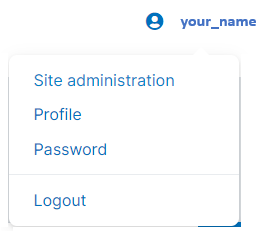
In the Studies menu, select Manage studies / Central Data Catalog

Click on Add study

In Create new study, select Document
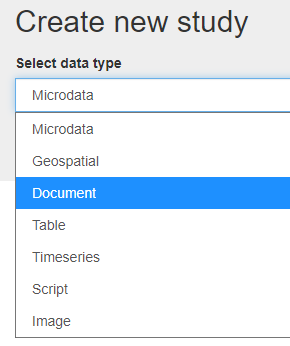
Click on Metadata.

Enter some information in the form, then click on the Save button.
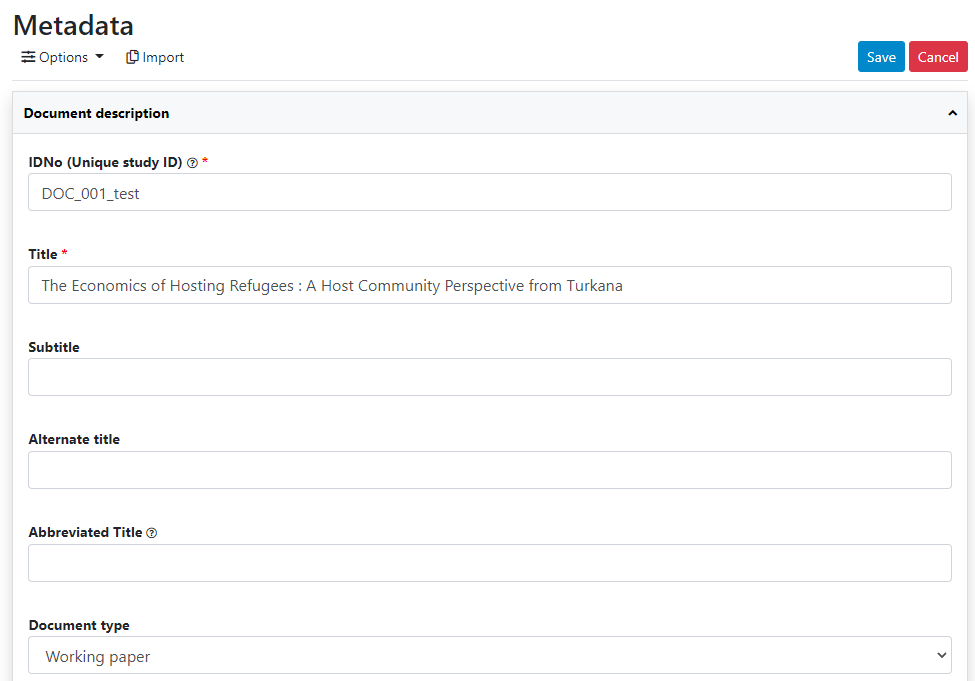
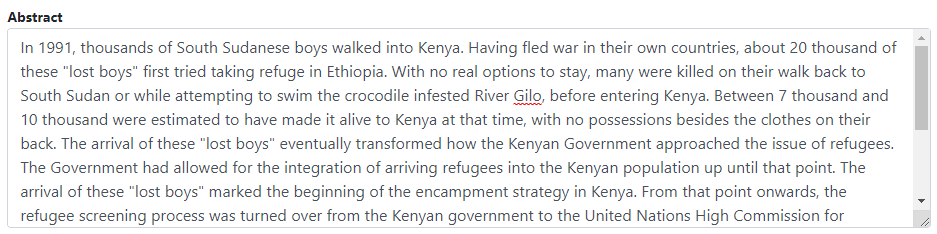
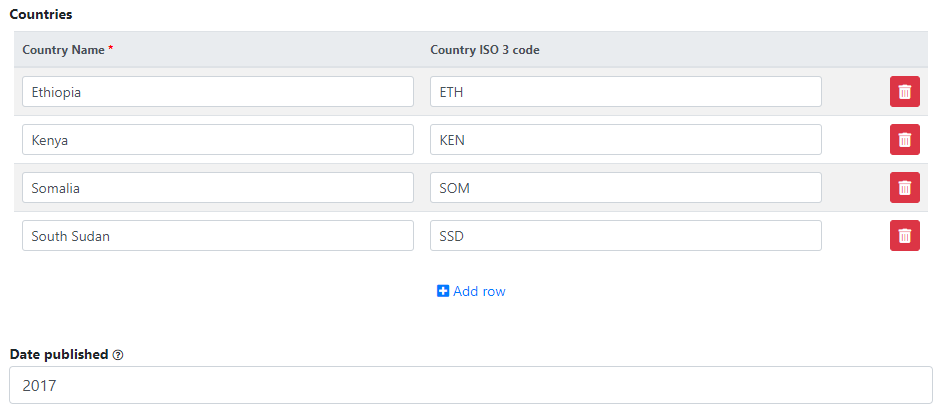
Go back to the entry page (press the "back" button of your browser).
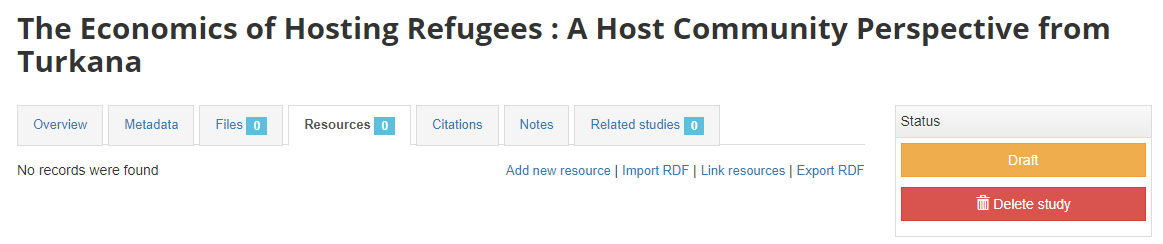
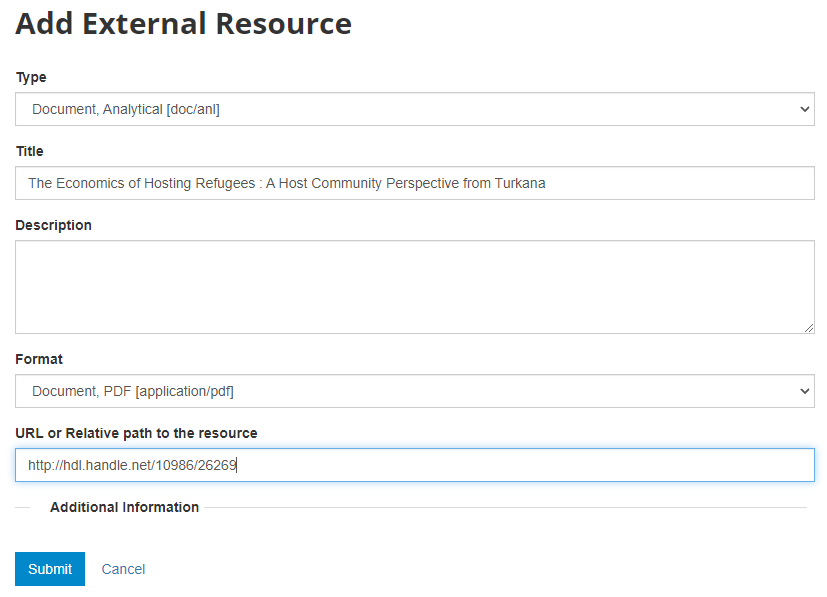
What has been done so far is generating and publishing the document description on the catalog. We have not provided any link to the document. One option would be to upload the PDF to your web server and make the document available from your website. In this case however, we want to provide a link to an external server. Click Add new resource and provide information on the type of resource you are providing a link to (in this case an analytical document), the resource title (in this case it will be the title of the document, but in some cases, you may want to attach multiple files to a document, e.g., an annex containing the tables in Excel format, etc.) Provide a URL to the site you want to link to (the alternative would be to provide the path and filename of the PDF file, for upload to your server). Click Submit.
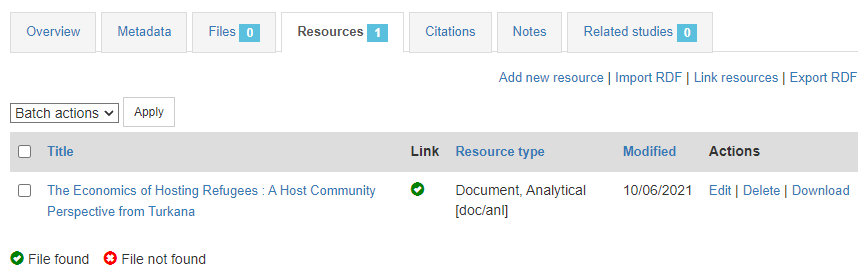
Now the document metadata and the link to the resource are both provided. But the entry is still in draft mode (i.e. only visible to administrators).
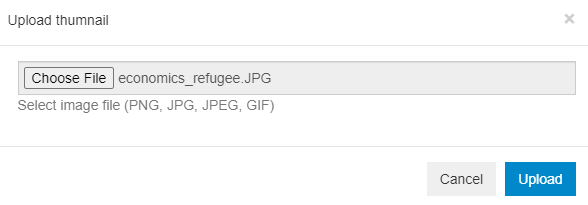
The last step will be to upload a thumbnail (optional), and to make this entry visible in your catalog by changing its Status from "Draft" to "Published". For a document, a screenshot of the cover page is the recommended thumbnail.
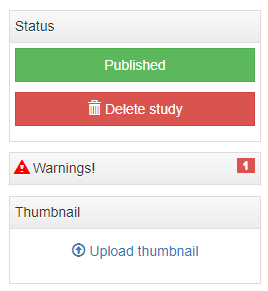
The entry is now visible to visitors of your catalog and in the Dashboard of the Site administration interface (where you can unpublish or delete it).

The study listing page in the user interface, with no thumbnail:

The study listing page in the user interface, with thumbnail:

The header of the entry page, with no thumbnail:

The header of the entry page, with a thumbnail:

Loading metadata (API)
This option is currently not available. It will be added in a future version of NADA.
From scratch (API)
You can generate the metadata using R or Python, then publish it using the NADA API and the NADAR package or PyNADA library.
An example of R and Python scripts was provided in section "Getting Started -- Publishing a document". That example is available in the NADA GitHub repository as Use Case 001.
We provide here another example, where a list of documents with their core metadata is available as a CSV file. A script (written in R or in Python) reads the file, maps the columns of the file to the schema elements, and publishes the documents in NADA. This example corresponds to Use Case 002 in the NADA GitHub repository.
# ==============================================================================
# NADA Demo Catalog - Use of API examples                      Use case ID: 002
#
# Use case description: generate metadata and publish in NADA a collection of
# documents for which metadata are available in a CSV file.
# The CSV file contains the following columns:
#   - document_url
#   - pdf_url	(URL to the PDF version of the document)
#   - txt_url	(URL to the TXT version of the document, if available)
#   - author (list of authors, as one string)
#   - identifier (unique identifier of the document; could be a DOI or other)
#   - abstract
#   - series
#   - language (we assume here that only English or French are valid values)
#   - publisher
#   - title
#   - type
#   - date_published (in ISO format; could be YYY, or YYYY-MM, or YYYY-MM-DD)
#   - countries (country names, separated by a ";")
#
# The published metadata will be structured using a schema described in:
#    https://ihsn.github.io/nada-api-redoc/catalog-admin/#tag/Documents
#
# Script tested with NADA version: 5.0
# Date: 2021-09-10
# See output in http://nada-demo.ihsn.org/index.php/catalog
#
#   ** This script requires a valid API key with administrator privileges.**
#
# ==============================================================================

library(nadar)
library(readxl)
library(rlist)
library(stringr)

# Set API key (stored in a CSV file; not to be entered in clear) and catalog URL

my_keys <- read.csv("C:/CONFIDENTIAL/my_keys.csv", header=F, stringsAsFactors=F)
set_api_key(my_keys[5,1])  # Assuming the key is in cell A5
set_api_url("http://nada-demo.ihsn.org/index.php/api/")
set_api_verbose(FALSE)

# Set the default folder, and load the CSV file

setwd("E:/demo_nada_files/UC002")
doc_list <- read.csv("NADA_demo_list_docs.csv", stringsAsFactors=FALSE)

# Generate the schema-compliant metadata, and publish in NADA catalog
# We need to map the columns in the CSV file to elements of the schema.

for(i in 1:nrow(doc_list)) {

  # Download the PDF file if not already done

  pdf_url  <- doc_list$pdf_url[i]
  pdf_filename <- paste0(doc_list$identifier[i], ".pdf")
  if(!file.exists(pdf_filename)) {
    download.file(pdf_url, pdf_filename, mode="wb")
  }

  # Take a screenshot of the cover page to be used as thumbnail

  thumb_file <- gsub(".pdf", ".jpg", pdf_filename)
  capture_pdf_cover(pdf_filename)

  # Map the CSV columns to metadata elements from the schema

  id        <- doc_list$identifier[i]
  title     <- doc_list$title[i]
  date      <- as.character(doc_list$date_published[i])
  abstract  <- doc_list$abstract[i]
  publisher <- doc_list$publisher[i]
  series    <- doc_list$series[i]
  type      <- doc_list$type[i]

  author_list = list()
  authors <- unlist(strsplit(doc_list$author[i], ";"))
  for(a in authors) {
    author = unlist(strsplit(a, ","))  # Format in CSV is "lastname, firstname"
    ln = str_trim(author[1])
    fn = str_trim(author[2])
    this_author = list(last_name = ln, first_name = fn)
    author_list = list.append(author_list, this_author)
  }

  if(doc_list$language[i] == "English") {
    lang_name = "English"
    lang_code = "EN"
  } else if (doc_list$language[i] == "French") {
    lang_name = "French"
    lang_code = "FR"
  }
  language  <- list(list(name=lang_name, code=lang_code))

  ctry_list = list()
  countries <- unlist(strsplit(doc_list$countries[i], ";"))
  for(c in countries) {
    ctry = list(name = str_trim(c)) # Removes start/end whitespaces
    ctry_list = list.append(ctry_list, ctry)
  }

  # Document the file, and publish in the NADA catalog

  this_doc_metadata <- list(

    metadata_information = list(    # This block is optional but recommended
      producers = list(
        list(name = "NADA team")
      ),
      production_date = "2021-09-11",
      version = "v01"
    ),

    document_description = list(
      title_statement = list(idno = id, title = title),
      date_published = date,
      type = type,
      authors = author_list,
      series = series,
      publisher = publisher,
      abstract = abstract,
      ref_country = ctry_list,
      languages = language
    )

  )

  # Publish the document in the NADA central catalog

  add_document(idno = this_doc_metadata$document_description$title_statement$idno,
               metadata = this_doc_metadata,
               repositoryid = "central",
               published = 1,
               thumbnail = thumb_file,
               overwrite = "yes")

  # Note: to publish the document in a collection (e.g. "Handbooks"), we would
  # enter repositoryid = "Handbooks" instead of "repositoryid = "central".
  # The collection must have been previously created in the catalog.

  # ==============================================================================
  # Uploading the document metadata will not upload the document itself. To make
  # the document available in/from the catalog, we need to upload the file to the
  # server or provide a link to an external URL, as an "external resource".
  # More than one resource can be attached to a catalog entry, as long as their
  # title differ; here, some documents are available in PDF and TXT formats.
  # ==============================================================================

  # The "type" column in the CSV file does not comply with dctype in the
  # external resources schema; we map the types accordingly
  # Note: to get a list of types found in the CSV file: table(doc_list$type)

  if(doc_list$type[i] == "book")   dctype = "doc/ref"   # Reference document
  if(doc_list$type[i] == "manual") dctype = "doc/ref"

  # Provide a link to the PDF file and to the TXT file if it exists
  # If we have links to a PDF and a TXT file, we mention the format in the title.
  title_pdf = title
  if(doc_list$txt_url[i] != "") {
    title_pdf = paste0(title, " - PDF version")
    title_txt = paste0(title, " - TXT version")
  }

  # Create link to PDF file
  external_resources_add(
    title = title_pdf,
    idno = this_doc_metadata$document_description$title_statement$idno,
    dctype = dctype,
    file_path = doc_list$pdf_url[i],
    overwrite = "yes"
  )

  # Create link to TXT file, if it exists
  if(doc_list$txt_url[i] != "") {
    external_resources_add(
      title = title_txt,
      idno = this_doc_metadata$document_description$title_statement$idno,
      dctype = dctype,
      file_path = doc_list$txt_url[i],
      overwrite = "yes"
    )
  }

}

# Alternative: If we wanted to upload the PDF file instead of providing a link :

  # external_resources_add(
  #   title = title,
  #   idno = this_doc_metadata$document_description$title_statement$idno,
  #   dctype = dctype,
  #   file_path = pdf_filename,
  #   overwrite = "yes"
# )# ==============================================================================
# NADA Demo Catalog - Use of API examples Use case ID: 002
#
# Use case description: generate metadata and publish in NADA a collection of
# documents for which metadata are available in a CSV file.
# The CSV file contains the following columns:
# - document_url
# - pdf_url (URL to the PDF version of the document)
# - txt_url (URL to the TXT version of the document, if available)
# - author (list of authors, as one string)
# - identifier (unique identifier of the document; could be a DOI or other)
# - abstract
# - series
# - language (we assume here that only English or French are valid values)
# - publisher
# - title
# - type
# - date_published (in ISO format; could be YYY, or YYYY-MM, or YYYY-MM-DD)
# - countries (country names, separated by a ";")
#
# The published metadata will be structured using a schema described in:
# https://ihsn.github.io/nada-api-redoc/catalog-admin/#tag/Documents
#
# Script tested with NADA version: 5.0
# Date: 2021-09-29
# See output in http://nada-demo.ihsn.org/index.php/catalog
#
# ** This script requires a valid API key with administrator privileges.**
#
# ==============================================================================
import os
import pandas as pd
import pynada as nada
# Set API key (stored in a CSV file; not to be entered in clear) and catalog URL
my_keys = pd.read_csv("confidential/my_keys.csv", header=None)
nada.set_api_key(my_keys.iat[1, 0])
nada.set_api_url('https://nada-demo.ihsn.org/index.php/api/')
# Set the default folder, and load the CSV file
os.chdir("E:/demo_nada_files/UC002")
doc_list = pd.read_csv("NADA_demo_list_docs.csv", encoding='cp1252')
# Generate the schema-compliant metadata, and publish in NADA catalog
# We need to map the columns in the CSV file to elements of the schema.
for i in range(len(doc_list)):
# Download the file if not already done
pdf_url = doc_list['pdf_url'][i]
pdf_filename = doc_list['identifier'][i] + ".pdf"
if not os.path.exists(pdf_filename):
nada.download_file(url=pdf_url, output_fname=pdf_filename, mode='wb')
# Take a screenshot of the cover page to be used as thumbnail
thumb_file = nada.pdf_to_thumbnail(pdf_filename, page_no=1)
# Map the CSV columns to metadata elements from the schema
idno = doc_list['identifier'][i]
title = doc_list['title'][i]
date = str(doc_list['date_published'][i])
abstract = doc_list['abstract'][i]
publisher = doc_list['publisher'][i]
series = doc_list['series'][i] if pd.notna(doc_list['series'][i]) else ""
dtype = doc_list['type'][i]
author_list = []
authors = doc_list['author'][i].split(';')
# Format in CSV is "lastname, firstname"
# NADA API - "authors":[{"first_name":"","initial":"", "last_name":""}]
for a in authors:
this_author = {'first_name': (a.split(',')[1]).strip(),
'last_name': (a.split(',')[0]).strip()
}
author_list.append(this_author)
language = []
lang_list = doc_list['language'][i].split()
for lang in lang_list:
ln = {}
if lang == "English":
ln = {"name": 'English', "code": 'EN'}
elif lang == "French":
ln = {"name": 'French', "code": 'FR'}
language.append(ln)
ctry_list = []
countries = doc_list['countries'][i].split(';')
for c in countries:
ctry = {'name': c.strip()}
ctry_list.append(ctry)
# Document the file, and publish in the NADA catalog
this_doc_metadata = {
'metadata_information': {
# This block is optional but recommended
'producers': [{'name': "NADA team"}],
'production_date': "2021-09-11",
'version': "v01",
},
'document_description': {
'title_statement':
{"idno": idno,
"title": title
},
'type': dtype,
'abstract': abstract,
'ref_country': ctry_list,
'date_published': date,
'languages': language,
'series': series,
'authors': author_list,
'publisher': publisher,
}
}
# Publish the document in the NADA central catalog
idno = this_doc_metadata['document_description']['title_statement']['idno']
nada.create_document_dataset(
dataset_id=idno,
repository_id="central",
published=1,
overwrite="yes",
**this_doc_metadata,
thumbnail_path=thumb_file
)
# Note: to publish the document in a collection (e.g. "Handbooks"), we would
# enter repositoryid = "Handbooks" instead of "repositoryid = "central".
# The collection must have been previously created in the catalog.
# ==============================================================================
# Uploading the document metadata will not upload the document itself. To make
# the document available in/from the catalog, we need to upload the file to the
# server or provide a link to an external URL, as an "external resource".
# More than one resource can be attached to a catalog entry, as long as their
# title differ; here, some documents are available in PDF and TXT formats.
# ==============================================================================
# The "type" column in the CSV file does not comply with dctype in the
# external resources schema; we map the types accordingly
# Note: to get a list of types found in the doc_list dataframe, use:
# doc_list['type'].value_counts()
reference_documents = ["book", "manual"]
if doc_list['type'][i] in reference_documents:
dctype = "doc/ref"
# Provide a link to the PDF file and to the TXT file if it exists
# If we have links to a PDF and a TXT file, we mention the format in the title.
if pd.notna(doc_list['pdf_url'][i]):
title_pdf = title + " - PDF version"
if pd.notna(doc_list['txt_url'][i]):
title_txt = title + " - TXT version"
# Create link to PDF file
if pd.notna(doc_list['pdf_url'][i]):
nada.add_resource(
dataset_id=idno,
dctype=dctype,
title=title_pdf,
file_path=doc_list['pdf_url'][i],
overwrite="yes"
)
# Create link to TXT file, if it exists
if pd.notna(doc_list['txt_url'][i]):
nada.add_resource(
dataset_id=idno,
dctype=dctype,
title=title_txt,
file_path=doc_list['txt_url'][i],
overwrite="yes"
)
# Alternative: If we wanted to upload the PDF file instead of providing a link :
# nada.add_resource(
# dataset_id=idno,
# dctype=dctype,
# title=title,
# file_path=pdf_filename,
# overwrite="yes"
# )Enabling a PDF document viewer
@@@@ iFrame - Show document in NADA page